
SmartKey positions
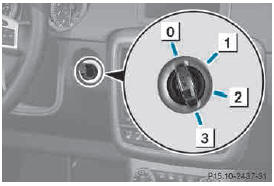
0 To remove the SmartKey
1 Power supply for some consumers, such
as the windshield wipers
2 Ignition (power supply for all consumers)
and drive position
3 To start the engine
As soon as the ignition is switched on, all the indicator lamps in the instrument cluster light up. If an indicator lamp does not go out after starting the engine or lights up while driving, see .
If the SmartKey is in position 0 in the ignition lock for an extended period of time, it can no longer be turned in the ignition lock. The steering is then locked. To unlock, remove the SmartKey and reinsert it into the ignition lock.
The steering is locked when you remove the SmartKey from the ignition lock.
► Remove the SmartKey when the engine is switched off.
The starter battery could otherwise be discharged.
If you cannot turn the SmartKey in the ignition lock, the starter battery may not be charged sufficiently.
► Check the starter battery and charge it if necessary .
or
► Jump-start the vehicle .
You can only remove the SmartKey if: Rthe SmartKey is in position 0 in the ignition lock.
Rthe automatic transmission selector lever is in P.
See also:
Displaying the coolant temperature
WARNING
Driving when your engine is overheated can
cause some fluids which may have leaked into
the engine compartment to catch fire. You
could be seriously burned.
Steam from an overheated eng ...
Restoring the factory settings
X Press the or
button on the
steering wheel to select the Sett. menu.
► Press the or
button to select the
Factory Setting submenu.
► Press to confirm.
The Reset All Settings? ...
Winter driving
General no
DANGER
If the exhaust pipe is blocked or adequate
ventilation is not possible, poisonous gases
such as carbon monoxide (CO) may enter the
vehicle. This is the case, e.g. if the vehicle ...