
Cargo compartment cover
Important safety notes
When loading the vehicle, make sure that you do not stack the load in the cargo compartment higher than the lower edge of the side windows. Do not place heavy objects on top of the cargo compartment cover.
The cargo compartment cover is located behind the rear bench seat backrest.
Opening and closing the cargo compartment cover
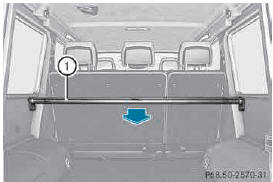
► To
open
: pull cargo compartment cover 1 back and clip it into the retainers on the left and right of the rear door.
► To
close
: unclip cargo compartment cover 1 and guide it forwards until it is completely rolled up.
Installing/removing the cargo compartment cover
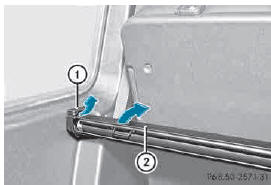
► To
remove
: make sure that cargo compartment cover 2 is rolled up.
► Slide catches 1 on the left-hand and righthand sides of cargo compartment cover 2 towards the center of the vehicle.
► Swing cargo compartment cover 2 up and out.
► To
install
: slide catches 1 towards the center of the vehicle.
► Insert cargo compartment cover 2 into the recesses in the side trim.
► Push down the right-hand and left-hand sides of cargo compartment cover 2 until it engages.
► Slide catches 1 in the direction of the side trim.
See also:
ESP® (Electronic Stability Program)
General notes
Observe the "Important safety notes" section .
ESP® monitors driving stability and traction,
i.e. power transmission between the tires and
the road surface.
If ESP ...
Tachometer
Do not drive in the overrevving range, as
this could damage the engine.
The red band in the tachometer indicates the
engine's overrevving range.
The fuel supply is interrupted to protect the
...
Operating the roller sunblinds for the
panorama roof with power tilt/sliding
panel
Important safety notes
WARNING
When opening or closing the roller sunblind,
parts of the body could be trapped between
the roller sunblind and the frame or sliding
sunroof. There is a risk of inj ...