
Refueling
Opening/closing the fuel filler flap
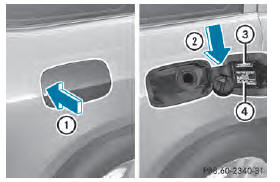
1 To open the fuel filler flap
2 To insert the fuel filler cap
3 Fuel type to be used
4 Tire pressure table
The fuel filler flap is unlocked or locked automatically when you open or close the vehicle with the SmartKey or with KEYLESSGO.
The position of the fuel filler cap is displayed
 in the instrument cluster. The
arrow
next to the filling pump indicates the side of
the vehicle.
Opening
■ Switch the engine off.
■ Remove the SmartKey from the ignition lock.
■ KEYLESS-GO: open the driver’s door.
This corresponds to key position 0: "key removed".
The driver’s door can be closed again.
■ Press the fuel filler flap in the direction of arrow 1.
The fuel filler flap swings up.
■ Turn the fuel filler flap counter-clockwise and remove it.
■ Insert the fuel filler cap into the holder bracket on the inside of filler flap 2.
■ Completely insert the filler neck of the fuel pump nozzle into the tank, attach and refuel.
■ Only fill the tank until the pump nozzle switches off.
Do not add any more fuel after the pump stops filling for the first time. Otherwise, fuel may leak out.
Closing
■ Replace the cap on the filler neck and turn clockwise until it engages audibly.
■ Close the fuel filler flap.
Close the fuel filler flap before locking the vehicle.
If you are driving with the fuel filler cap
open, the reserve fuel warning lamp
flashes.
In addition, the  Check Engine
warning lamp may light up .
A message appears in the multifunction display .
For further information on warning and indicator lamps in the instrument cluster, see .
See also:
Display messages
General notes
WARNING
All categories of messages contain important information which should be taken
note of and,
where a malfunction is indicated, addressed as soon as possible at an authorized
...
Temperature
WARNING
The temperature grade for this tire is
established for a tire that is properly inflated
and not overloaded. Excessive speed,
underinflation, or excessive loading, either
separately or in ...
Stowage nets
WARNING
Vehicles with the Occupant Classification
System (OCS):
If the gross weight of the objects in the
stowage net on the back of the frontpassenger
seat is greater than 4.4 lb (2 kg),
OCS ca ...