
Combination switc
Turn signals
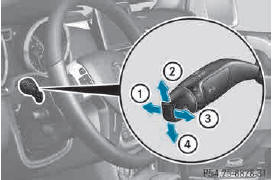
1 High-beam headlamps
2 Turn signal, right
3 High-beam flasher
4 Turn signal, l
► To indicate briefly:
press the combination switch briefly to the pressure point in the direction of arrow 2 or 4.
The corresponding turn signal flashes three times.
► To indicate
: press the combination switch beyond the pressure point in the direction of arrow 2 or 4.
High-beam headlamps
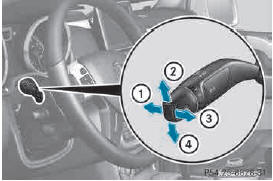
1 High-beam headlamps
2 Turn signal, right
3 High-beam flasher
4 Turn signal, left
X To switch on the high-beam headlamps:
turn the SmartKey in the ignition lock to position 2 or start the engine.
► Turn the light switch to  or
or
 .
.
► Press the combination switch beyond the pressure point in the direction of arrow 1.
In the  position, the high-beam
headlamps are only switched on when it is
dark and the engine is running.
The blue  indicator lamp in the
instrument cluster lights up when the highbeam
headlamps are switched on.
► To switch off the high-beam headlamps
: move the combination switch back to its normal position.
The blue  indicator lamp in the
instrument cluster goes out.
High-beam flasher
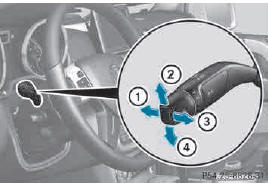
1 High-beam headlamps
2 Turn signal, right
3 High-beam flasher
4 Turn signal, left
► To switch on: turn the SmartKey in the ignition lock to position 1 or 2 or start the engine.
► Pull the combination switch briefly in the direction of arrow 3.
See also:
Genuine Mercedes-Benz parts
All Mercedes-Benz Centers maintain a supply
of genuine Mercedes-Benz parts for
necessary service and repair work. In
addition, strategically located parts delivery
centers provide for quick and re ...
Dimensions and weights
The missing values for the following models
were not available at time of going to print:
RG 63 AMG
The missing values for the following model
were not available at the time of going to
print ...
Correct driver's seat position
Observe the safety guidelines on seat
adjustment.
- Check whether you have adjusted seat 3
properly.
Electrical seat adjustment
When adjusting the seat, make sure:
- you a ...