
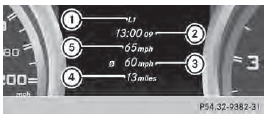
AMG menu in AMG vehicles
AMG displays
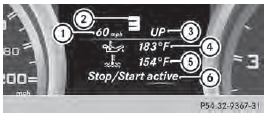
1 Digital speedometer
2 Gear indicator
3 Upshift indicator
4 Engine oil temperature
5 Coolant temperature
6 Status indicator (indicator not available in
USA/Canada)
■ Press or
or
 on the steering wheel
to select the AMG menu.
Upshift indicator UP 3 indicates that the engine has reached the overrevving range when in the manual gearshift program.
Upshift indicator UP 3 fades out other messages until you have shifted up.
If the engine oil temperature is below 176

(80  ) the oil temperature is shown
in blue.
Avoid driving at full engine output during this time.
SETUP
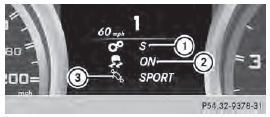
1 Drive program (C/S/M)
2 ESP® mode (ON/OFF)
3 Suspension tuning (COMFORT/SPORT/
SPORT+)
SETUP shows the drive program, the ESP® (Electronic Stability Program) mode and the suspension tuning.
■ Press the or
button on the
steering wheel to select the AMG menu.
■ Press the  button repeatedly until
SETUP is displayed.
RACETIMER
Displaying and starting RACETIMER
The RACETIMER is only intended for use on a closed race circuit. Do not use the function on public roads.
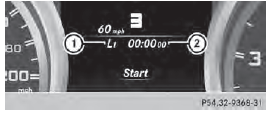
1 Lap
2 RACETIMER
You can start the RACETIMER when the engine is running or if the SmartKey is in position 2 in the ignition lock.
■ Press or
on the steering wheel
to select the AMG menu.
■ Press the button repeatedly until
the
RACETIMER is shown.
■ To start: press the  button to
start the
RACETIMER.
Displaying the intermediate time
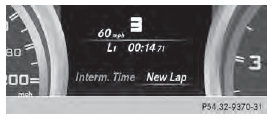
■ Press the or
button to select
Interm. Time.
■ Press to confirm.
The intermediate time is displayed for five seconds.
Starting a new lap
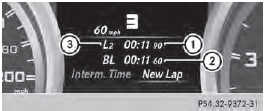
1 RACETIMER
2 Fastest lap time (best lap)
3 Lap
■ Press to confirm New Lap
It is possible to store a maximum of sixteen laps. The 16th lap can only be completed with Finish Lap.
Stopping the RACETIMER
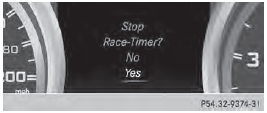
■ Press the  button on the
steering
wheel.
■ Press to confirm Yes.
The RACETIMER interrupts timing when you
stop the vehicle and turn the SmartKey to
position 1 in the ignition lock. If you turn the
SmartKey to position 2 or 3 and then press
to confirm Start, timing is
continued.
Resetting the current lap
■ Stop the RACETIMER.
■ Press the or
button to select
Reset Lap.
■ Press to reset the lap time to
"0".
Deleting all laps
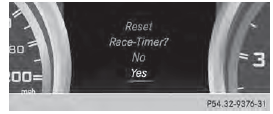
If you switch off the engine, the RACETIMER is reset to "0" after 30 seconds. All laps are deleted.
You cannot delete individual stored laps. If you have stopped 16 laps, the current lap does not have to be reset.
■ Reset the current lap.
■ Press to confirm Reset.
Reset Race Timer? appears in the multifunction display.
■ Press the  button to select Yes
and
press the button to confirm.
All laps are deleted.
Overall statistics
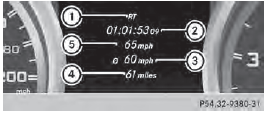
1 RACETIMER overall evaluation
2 Total time driven
3 Average speed
4 Distance covered
5 Maximum speed
This function is shown if you have stored at least one lap and stopped the RACETIMER.
■ Press the or
button on the
steering wheel to select the AMG menu.
■ Press the  button repeatedly until
the
overall evaluation is shown.
Lap statistics
1 Lap
2 Lap time
3 Average lap speed
4 Lap length
5 Top speed during lap
This function is only available if you have stored at least two laps and have stopped the RACETIMER.
■ Press the or
button on the
steering wheel to select the AMG menu.
■ Press the button repeatedly until
the
lap evaluation is shown.
Each lap is shown in a separate submenu.
The fastest lap is indicated by flashing symbol 1.
■ Press the or
button to select a
different lap evaluation.
See also:
Information regarding technical
data
The data stated here specifically refers to
a vehicle with standard equipment. Consult
an authorized Mercedes-Benz Center for
the data for all vehicle variants and trim
levels. ...
Winter operation
General notes
Have your vehicle winterproofed at a qualified
specialist workshop at the onset of winter.
Observe the notes in the "Changing a wheel" section . ...
Maximum load rating
WARNING
Do not overload the tires by exceeding the
specified load limit as indicated on the Tire
and Loading Information placard on the
driver's door B-pillar. Overloading the tires
can overheat ...