
Opening and closing the side windows
The switches for all side windows are located on the driver's door. There is also a switch on each door for the corresponding side window.
The switches on the driver's door take precedence.
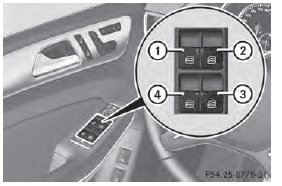
1 Front left
2 Front right
3 Rear right
4 Rear left
■ Turn the SmartKey to position 1 or 2 in the ignition lock.
■ To open: press the corresponding switch.
■ To close: pull the corresponding switch.
If you press the switch beyond the point of resistance, an automatic opening/ closing process is started in the corresponding direction. You can stop automatic operation by operating the switch again.
You can continue to operate the side windows after you switch off the engine or remove the SmartKey. This function is available for up to five minutes or until the driver's or front-passenger door is opened.
The side windows cannot be operated from the rear when the override feature for the side windows is activated .
See also:
Adaptive brake
ADAPTIVE BRAKE provides increased braking
safety. In addition to the braking function,
ADAPTIVE BRAKE also has the HOLD function and hill start assist
. ...
Setting the rear-compartment air
vents
Setting the center vents in the rear
compartment
Example: center vents with rear control panel
1 Rear-compartment air vent thumbwheel
2 Rear-compartment air vent, right
3 Rear control panel
4 ...
Driving on wet roads
Hydroplaning
If water has accumulated to a certain depth
on the road surface, there is a danger of
hydroplaning occurring, even if:
• you drive at low speeds.
• the tires have adequate tread dept ...