
Combination switch
Turn signal
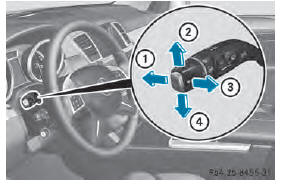
1 High-beam headlamps
2 Turn signal, right
3 High-beam flasher
4 Turn signal, left
■ To indicate briefly: press the combination switch briefly to the pressure point in the direction of arrow 2 or 4.
The corresponding turn signal flashes three times.
■ To indicate: press the combination switch beyond the pressure point in the direction of arrow 2 or 4.
High-beam headlamps
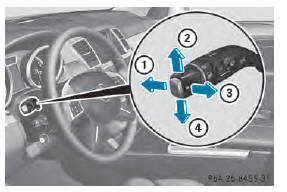
1 High-beam headlamps
2 Turn signal, right
3 High-beam flasher
4 Turn signal, left
■ To switch on the high-beam headlamps: turn the SmartKey in the ignition lock to position 2 or start the engine.
■ Turn the light switch to  or
or
 .
.
■ Press the combination switch beyond the
pressure point in the direction of
arrow :.
In the  position, the high-beam
headlamps are only switched on when it is
dark and the engine is running.
The blue  indicator lamp in the
instrument cluster lights up when the highbeam
headlamps are switched on.
■ To switch off the high-beam headlamps: move the combination switch back to its normal position.
The blue  indicator lamp in the
instrument cluster goes out.
Vehicles with Adaptive Highbeam Assist: when Adaptive Highbeam Assist is active, it controls activation of the high-beam headlamps .
High-beam flasher
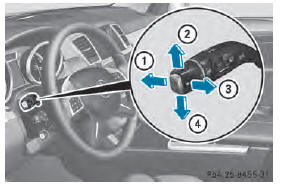
1 High-beam headlamps
2 Turn signal, right
3 High-beam flasher
4 Turn signal, left
■ To switch on: turn the SmartKey in the ignition lock to position 1 or 2 or start the engine.
■ Pull the combination switch in the direction of arrow 3.
See also:
Switching the windshield wipers on/
off
WARNING
The windshield will not longer be wiped
properly if the wiper blades are worn. This
could prevent you from observing the traffic
conditions, thereby causing an accident.
Replace the wip ...
Steering wheel heating
Activating/deactivating
1 To switch on the steering-wheel heating
2 To switch off the steering-wheel heating
3 Indicator lamp
The steering-wheel heating heats the leather
areas of the steering ...
Telephone menu
Introduction
WARNING
The driver's attention to the road must always
be his/her primary focus when driving. For
your safety and the safety of others, we
recommend that you pull over to a safe
loc ...