
Control panel for 3-zone automatic climate control with additional rearcompartment climate control
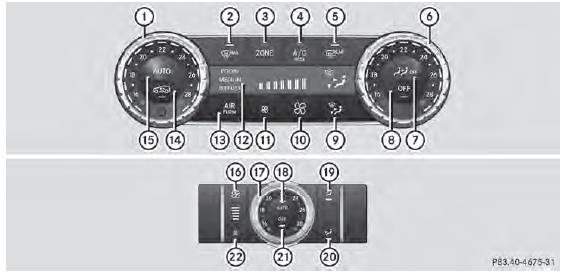
Canada only
Front control panel
1 Sets the temperature, left
2 Defrosts the windshield
3 Switches the ZONE function on/off
4 Activates/deactivates cooling with air dehumidification or
activates/ deactivates the residual heating function
5 Switches the rear window defroster on/off
6 Sets the temperature, right
7 Switches rear-compartment climate control on/off
8 Switches climate control on/off
9 Sets the air distribution
10 Increases the airflow
11 Reduces the airflow
12 Display
13 Adjusts the climate control settings
14 Activates/deactivates air-recirculation mode
15 Sets climate control to automatic
Rear control panel
16 Increases the airflow 17 Sets the temperature 18 Sets rear-compartment climate control to automatic 19 Directs the airflow through the rear air vents 20 Directs the airflow through the footwell vents 21 Switches rear-compartment climate control on/off 22 Reduces the airflow
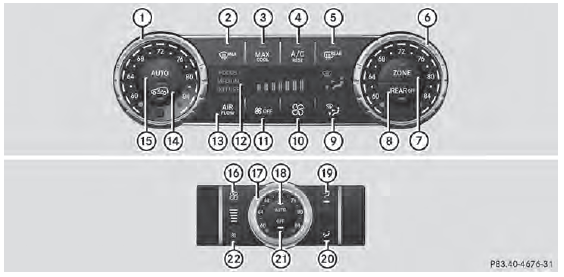
USA only
Front control panel
1 Sets the temperature, left
2 Defrosts the windshield
3 Switches maximum cooling MAX COOL on/off
4 Activates/deactivates cooling with air dehumidification or
activates/ deactivates the residual heating function
5 Switches the rear window defroster on/off
6 Sets the temperature, right
7 Switches the ZONE function on/off
8 Switches rear-compartment climate control on/off
9 Sets the air distribution
10 Increases the airflow
11 Reduces the airflow or switches off climate control
12 Display
13 Adjusts the climate control settings
14 Activates/deactivates air-recirculation mode
15 Sets climate control to automatic
Rear control panel
16 Increases the airflow 17 Sets the temperature 18 Sets rear-compartment climate control to automatic 19 Directs the airflow through the rear air vents 20 Directs the airflow through the footwell vents 21 Switches rear-compartment climate control on/off 22 Reduces the airflow
See also:
Securing cargo
Cargo tie-down rings
General notes
WARNING
The Top Tether anchorages cannot secure a
load. If you secure a load with the Top Tether
anchorages, the Top Tether anchorages could
be pulled out duri ...
Genuine Mercedes-Benz parts
Environmental note
Daimler AG also supplies reconditioned major
assemblies and parts which are of the same
quality as new parts. They are covered by the
same Limited Warranty entitlements as new
...
Trailer load/noseweight
The trailer load/noseweight affects the gross
weight of the vehicle. If a trailer is attached,
the trailer load/noseweight is included in the
load along with occupants and luggage. The
trailer loa ...