
Setting the temperature
Dual-zone automatic climate control
Different temperatures can be set for the driver's and front-passenger sides.
■ Turn the SmartKey to position 2 in the ignition lock .
■ To increase/reduce: turn control 1 or 6 clockwise or counter-clockwise .
Only change the temperature setting in small increments. Start at 72 ‡ (22 †).
3-zone automatic climate control
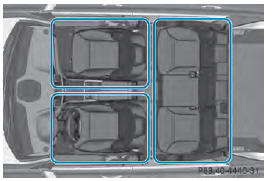
Automatic climate control zones
You can select different temperature settings for the driver's and front-passenger sides as well as for the rear compartment.
■ Turn the SmartKey to position 2 in the ignition lock .
■ To increase/reduce the temperature in the front: turn control 1 or 6 clockwise or counter-clockwise .
Only change the temperature setting in
small increments. Start at 72  (22
(22
 ).
).
■ To increase/reduce the temperature in
the rear compartment using the front
control panel: press the  button.
The indicator lamp in the  button
goes
out.
■ Turn control : clockwise or counterclockwise .
Only change the temperature setting in
small increments. Start at 72 (22
).
The temperature setting for the driver's side is adopted for the rear compartment and the front-passenger side.
■ To increase/decrease the rear compartment temperature using the rear control panel: turn control 17 clockwise or counter-clockwise on the rear control panel .
Only change the temperature setting in
small increments. Start at 72 (22
).
See also:
Opening/closing automatically from
outside
Important safety notes
WARNING
Parts of the body could become trapped
during automatic closing of the tailgate.
Moreover, people, e.g. children, may be
standing in the closing area or may enter ...
Windshield wipers
Switching the windshield wipers on/off
WARNING
Wiper blades are components that are subject
to wear and tear. Replace the wiper blades
twice a year, preferably in the spring and fall.
Otherwise ...
Roof carrier
WARNING
Do not load items on the roof. It may cause
instability during some maneuvers which
could result in an accident.
The roof is not suited for transporting loads.
Never use roof rails or o ...