
SmartKey functions
WARNING
If children are left unsupervised in the vehicle,
they could:
• open the doors, thus endangering other
people or road users.
• get out and disrupt traffic.
• operate the vehicle's equipment.
Additionally, children could set the vehicle in motion if, for example, they: • release the parking brake.
• shift the automatic transmission out of parking position P.
• shift the manual transmission into neutral.
• starting the engine.
There is a risk of an accident and injury.
When leaving the vehicle, always take the SmartKey with you and lock the vehicle. Never leave children or animals unattended in the vehicle. Always keep the SmartKey out of reach of children.
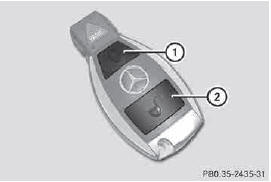
1  To lock the vehicle
2  To unlock the vehicle
► To unlock centrally: press the
button.
If you do not open the vehicle within approximately 40 seconds of unlocking: • the vehicle is locked again.
• the theft deterrent locking system is armed again.
► To lock centrally: press the
button.
The SmartKey centrally locks/unlocks: • the doors • the rear door • the fuel filler flap
When unlocking, the turn signals flash once. When locking, they flash three times.
You can also set an audible signal to confirm that the vehicle has been locked. The audible signal can be activated and deactivated using the on-board computer .
When it is dark, the surround lighting also comes on if it is activated in the on-board computer .
See also:
Problems with the side windows
WARNING
Closing the side windows with increased force
or without the anti-entrapment feature could
lead to serious or even fatal injury. Make sure
that nobody can become trapped when
closing the ...
Important safety notes
WARNING
If you operate information systems and
communication equipment integrated in the
vehicle while driving, you will be distracted
from traffic conditions. You could also lose
control of the ...
Maximum load rating
WARNING
Do not overload the tires by exceeding the
specified load limit as indicated on the Tire
and Loading Information placard on the
driver's door B-pillar. Overloading the tires
can overheat ...