
Stowage space
Important safety notes
WARNING
To help avoid personal injury during a collision
or sudden maneuver, exercise care when
storing objects in the vehicle. Put luggage or
cargo in the cargo compartment if possible.
Do not pile luggage or cargo higher than the seat backrests.
Keep compartment lids closed. This will help to prevent stored objects from being thrown about and injuring vehicle occupants during • braking • vehicle maneuvers • an accident
Stowage compartments in the front
Glove box
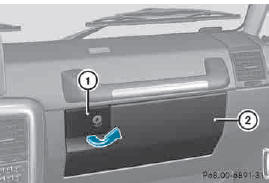
► To open: pull handle 1 and open glove box flap 2.
► To close: fold glove box flap 2 upwards until it engages.
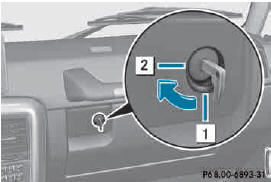
1 Glove box unlocked
2 Glove box locked
► To lock: insert the mechanical key into the lock and turn it 90° clockwise to position 2.
► To unlock: insert the mechanical key into the lock and turn it 90° counter-clockwise to position 1.
The glove box can only be locked and unlocked using the mechanical key.
Stowage compartment/telephone compartment under the armrest/in the center console
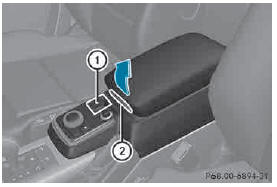
1 Small stowage compartment 2 Release button for the armrest
Stowage compartment/telephone compartment under the armrest X To open: press button 2.
► Fold up armrest.
In the stowage compartment, there is a stowage tray.
► To close: fold the armrest down.
The armrest engages audibly.
Stowage space in the rear
Stowage poc
WARNING
Storage bags are intended for storing lightweight
items only.
Heavy objects, objects with sharp edges or fragile objects may not be transported in the storage bag. In an accident, during hard braking, or sudden maneuvers, they could be thrown around inside the vehicle and cause injury to vehicle occupants.
Storage bags cannot protect transported goods in the event of an accident.
The stowage pockets are located on the rear side of the front seats.
See also:
Menu overview
Press the or
button on the
steering wheel to call up the menu bar and
select a menu.
Operating the on-board computer .
Depending on the equipment installed in the
vehicle, you ca ...
Mechanical key
General notes
If the vehicle can no longer be unlocked with
the SmartKey, use the mechanical key.
If you use the mechanical key to unlock and
open the driver's door or the rear door, the
anti-t ...
Instruction labels for tires and loads
WARNING
Overloaded tires can overheat, causing a
blowout. Overloaded tires can also impair the
steering and driving characteristics and lead
to brake failure. There is a risk of accident.
Obser ...